Nocturne for Mac
1.0.4
- User
-
- 6.5
- Not bad
- 56
- Softonic
-
- 8
- Very good
- Very good
- Your rating:
Your rating has been saved
Oops, something's gone wrong. Try again.
- License:
- Free
- Language:
- English
- OS::
-
- Mac
- Latest version:
- 1.0.4
- Last month's downloads:
- 161
- Size:
- 78 KB
- Developer:
- Developer's website
Report this software
Thank you! Your feedback will help us make software better for all of us.
Oops, something's gone wrong. Try again.
Versions of Nocturne
| Version | License | Language | O.S. |
|---|---|---|---|
| Nocturne 1.0.4 06/04/09 | Free | English |
|
| Nocturne 1.0.0 19/06/13 | Free | English |
|
Apps & Games content ratings on Softonic
Content ratings help you understand the type of content you might find in an app or game, so you can decide if they are suitable for you and your family.
What do the ratings actually tell me?
Content ratings describe the minimum age we feel the content is suitable for. It does not indicate that the app was specifically designed for that particular age, or if a certain level of skill is required to play the game or use the app.
Where can I find the content ratings?
You will find the content ratings on every app or game page.
Why are some apps or games unrated?
If an app or game does not have a rating, it means that it has not yet been rated, or it’s been rated and we’re working to update the page.

Rating Systems
Softonic uses the rating systems by PEGI and ESRB. The ratings you see may vary by country or region.
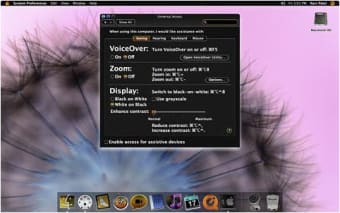
The color blind among you might have noticed that the Universal Access section in Preferences allows you to invert colors on your Mac. Nocturne performs a similar task, however giving you a bit more flexibility.
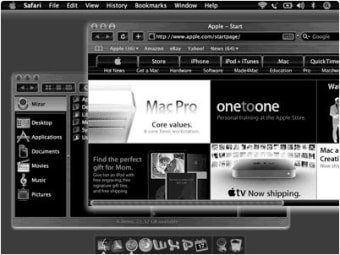
Accessible from your menu bar, Nocturne lets you switch quickly between what it calls day and night vision. Even if you aren't color blind, you'll notice that night vision is much easier on the eyes when using Nocturne in a low light environment.
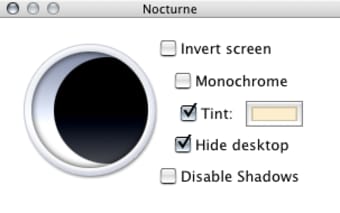
Nocturne's preferences can be played around with to customize day and night vision according to your needs. You can disable shadows and your desktop and create your own night vision by selecting two tints from the full color spectrum. You can also leave it in plain black and white.
Nocturne also lets you invert hue and screen. Give it a try to see what feels best for you. I felt the brightness adjustment slider was a bit limited though and couldn't really find a significant difference either way I set it.
Nocturne is a bit more advanced than the color inversion features found in Universal Access.
Recent changes
- Light sensors support on MacBook Pros
- Adjust tints
- Invert hue and screen
- Disable shadows and desktop
- Limited brightness adjustment
"Great but there are some bugs"
I love Nocturne. There is a bug that if I close my laptop the screen will be "day mode" even though it is set to "night." Also it does not effect my external display unless I close my laptop.
- Needs to stay in night mode when I reopen laptop.
- Needs to effect external display when my laptop is open
- Views:
- 20
- Date:
- 07 Jul 2016
Top Downloads: Themes and Effects
Top Downloads
-
Nocturne
Switch your Mac to night vision
- Dock Library
- Mac OS XP
- Fireplace
- Magnifique
Articles Nocturne
-
Today's downloads for Windows, Mac and Mobile
by Nick Mead
Windows: The Polaroid style is a visually-appealing effect to apply to your pictures, and now you can... See more
-
Today's downloads for Windows, Mac and Mobile
by Elena Santos
Windows: Growing tired of that old Windows XP look and feel? Try something different with the SevenVG... See more
Discover alternatives to and add-ons for Nocturne
Alternatives to Nocturne
-
Dock Library Free
Change the look and style of your Dock
-
Users'
Choice
Snö Free (GPL)
A snowy Christmas on your Mac
-
Softonic's
Choice
Iridium Free
White metal theme for your Mac desktop
Addons for Nocturne
- Nocturne doesn’t have any addons yet. Would you recommend any to us? Tell us
Do you want to be a part of our community?